If you would like to use a YouTube video, kindly download the video first. Once done, you can then upload the video using any FTP/SFTP software like CyberDuck with your site’s WebDAV details. Please make sure to upload it inside the content folder.
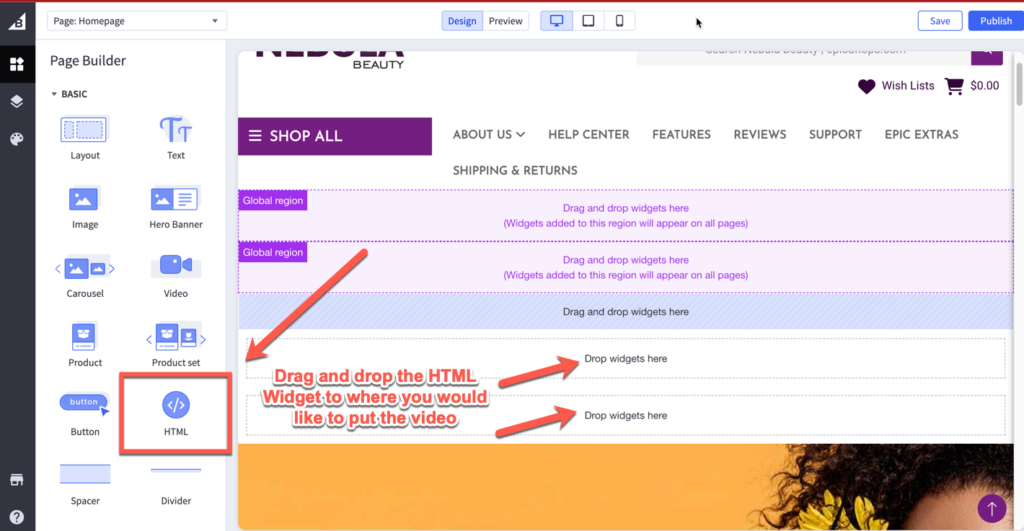
Next, is to go inside the Theme Customizer (Storefront > Themes > Customize button) and add an HTML widget where you would like to put the video. And then, copy and paste this script below:
HTML Script for the video:
Please note that you’ll need to edit the name and file type of the video you’ve uploaded and update the padding-top value as well. To know the recommended padding-top value, kindly check the example below.
Will need to get the resolution of the video you would like to use. This is needed to get the aspect ratio of the video.
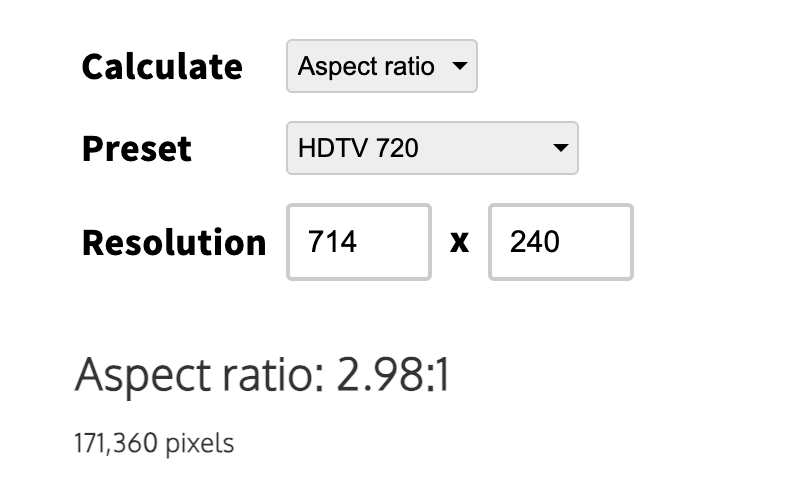
For example, I have a video with a resolution of 714 x 240. Using this calculator that computes the aspect ratio based on the resolution, it gives the aspect ratio of 2.98:1. The value that we will be using for the padding-top is 33.5% which we get from 1/2.98 or 0.335. That means 0.335 x 100% = 33.5%.
Once done, just save the changes and hit the Publish button.